Overview
The User login workflow trigger now fires for logins from the new Client Portal experience — not just legacy membership logins. We've also added a dedicated Client Portal category in the workflow trigger picker, so all Client Portal triggers live in one place.
What's New
New Client Portal logins now fire the "User login" trigger Successful logins from the new Client Portal experience now emit the same workflow trigger event as legacy membership logins. Any workflow already using the User login trigger will start running on these logins automatically — no reconfiguration required.
New "Client Portal" category in the trigger picker
A dedicated Client Portal category now groups all Client Portal triggers together:User login — moved from Courses
Client portal file uploaded — moved from Membership
Clearer helper text
The User login trigger now spells out that it covers both legacy membership logins and logins from the new Client Portal experience — removing the confusion caused by its old placement under Courses.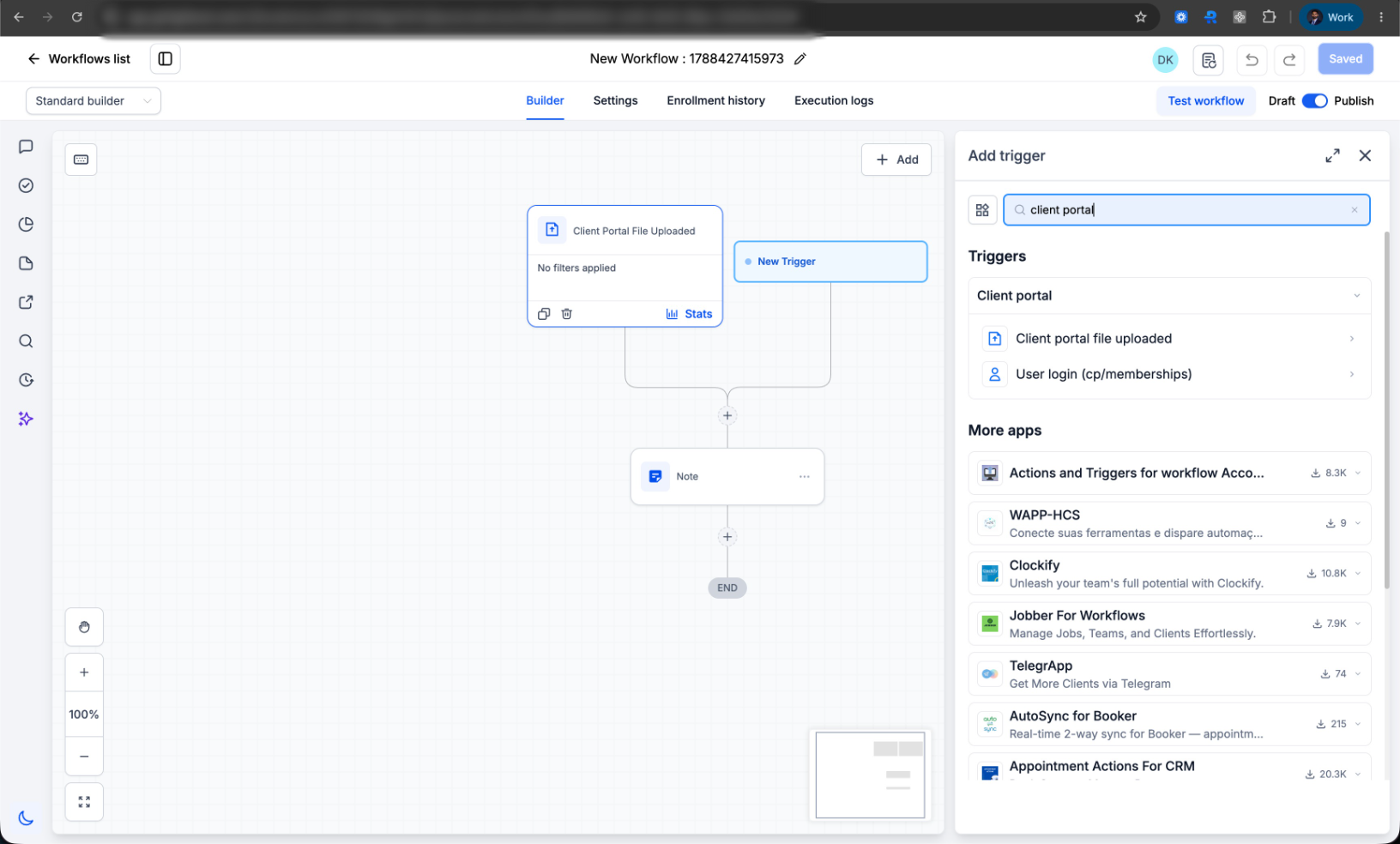
How to Use
Automate on Client Portal member login
- Open the Workflow Builder.
- Click Add trigger and search for User login.
- Select it under the new Client Portal category (previously found under Courses).
- Save your workflow — it will now fire on both legacy membership logins and logins from the new Client Portal experience.
Already using this trigger?
No action needed. Existing workflows continue to run as-is and will automatically pick up login events from the new Client Portal experience.Why This Matters
Accounts on the new Client Portal experience previously had no way to automate off a member login, because the trigger only covered legacy memberships. Trigger placement was inconsistent too — login sat under Courses while file upload sat under Membership — making it unclear what each trigger actually covered. This update closes the gap and puts both triggers where you'd expect to find them.
Was this article helpful?
That’s Great!
Thank you for your feedback
Sorry! We couldn't be helpful
Thank you for your feedback
Feedback sent
We appreciate your effort and will try to fix the article